
Flodesk Studio Complete Guide: Design On-Brand Emails in Minutes Using AI-Accelerated Templates

Flodesk Studio is a revolutionary, AI-accelerated email design app that allows you to create professional, on-brand emails in minutes. By combining a human-designed foundation with powerful AI tools, it eliminates design bottlenecks and platform lock-in, making high-end email marketing accessible to everyone from solopreneurs to enterprises.

Table of Contents
What Is Flodesk Studio?
Flodesk Studio is a brand-new, standalone email design app built by Flodesk that lets you create beautiful, on-brand emails in minutes instead of hours. Here's the core concept: you describe what you want, Studio generates three professionally designed directions using AI acceleration, and you refine it however you like—in chat or pixel-by-pixel.
Unlike generic AI tools that generate designs from scratch, Flodesk Studio uses a human-designed foundation. Real designers built thousands of individual component pieces—layouts, blocks, typography, color palettes—and the AI's job is to assemble those pieces based on your prompt and apply your brand. You stay in control of every pixel.
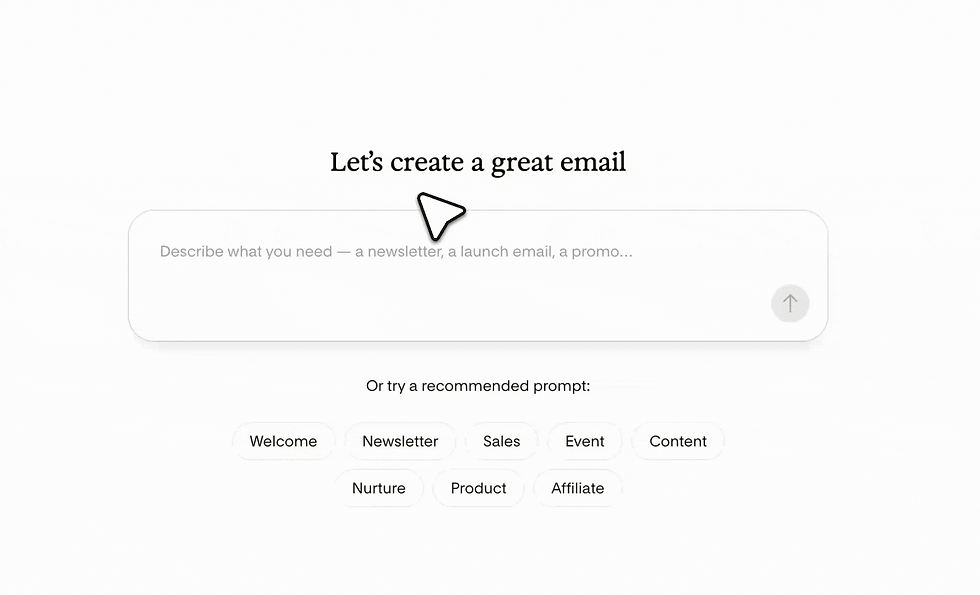
Key Differentiator: Flodesk Studio is accelerated, not generated . The AI doesn't create the art for you; it helps you create faster by starting from professionally designed components and applying your brand automatically.
The result? Professional-quality emails that look like a real designer touched them—because one did. And the best part: it's completely free while in beta. No credit card, no paid plan required.
Why Flodesk Studio Is Different: The Human-Designed AI Approach
Most AI tools follow a simple formula: generate the art for you. Flodesk built the opposite. Instead of handing you a finished design and hoping you like it, Studio hands you a designer-built system, applies your brand, and gets out of your way so you can create.
This distinction matters. We've all seen content that technically "works" but feels soulless—pretty, maybe, but not thoughtful. Not specific. Not the kind of design that makes someone think, "Oh, this feels like her."
With Flodesk Studio, knowing this as a Flodesk partner, the emails don't feel like you're starting from a blank page or handing the whole thing over to a machine. They feel like you're walking into a creative room where the foundations have already been considered. You still get to edit in chat. You still get to tweak the copy. You still get to adjust the layout. You still get to decide whether something feels right for your brand.
And that's the part that matters most: the artist is still you.
Step-by-Step Tutorial: Create Your First Email in 10-15 Minutes
Step 1: Set Up Your Brand (One Time Only)
Why This Matters This is the difference between an email that looks like a template and one that looks like you. Set your brand once, and every email Studio creates for you starts on-brand automatically.
Before you prompt anything, tell Studio who you are. Go to the Brand Management area and fill in:
Business Info: Your business name, website, and a short description of what you do and who you help
Brand Voice: Describe your tone in your own words. Examples: "warm, direct, conversational, like a knowledgeable friend" or "professional, authoritative, educational"
Brand Fonts: Upload your two brand fonts (heading and accent)
Brand Colors: Drop in your exact hex codes instead of eyeballing them
If you already use Flodesk, Studio can pull your brand assets over automatically—even faster.
Step 2: Write Your Prompt (Be Specific)
Pro Tip The clearer you are in your prompt, the closer the first result lands. You can start from just an idea, a few lines of copy, or a full rough draft.
Describe the email you want in plain language. Include:
The email type (welcome, newsletter, announcement, promotion, etc.)
The main message or call-to-action
Any specific content to feature
Tone descriptors if different from your brand default
Example: "Create a welcome email for new subscribers to my coaching program. Warm and inviting tone. Feature the free resource they just downloaded and a link to book a discovery call."
Step 3: Choose One of Three Directions
What You Get Studio generates three design directions off your prompt, usually a visual-heavy version, a banner-style version, and a cleaner plain-text version. Each one is already on-brand and ready to refine.
Pick the one that feels most like you. Flodesk says this gets you about 80% of the way there—and that matches real-world experience. Your copy is already in place, your brand is already applied, and you're ready to move to refinement.
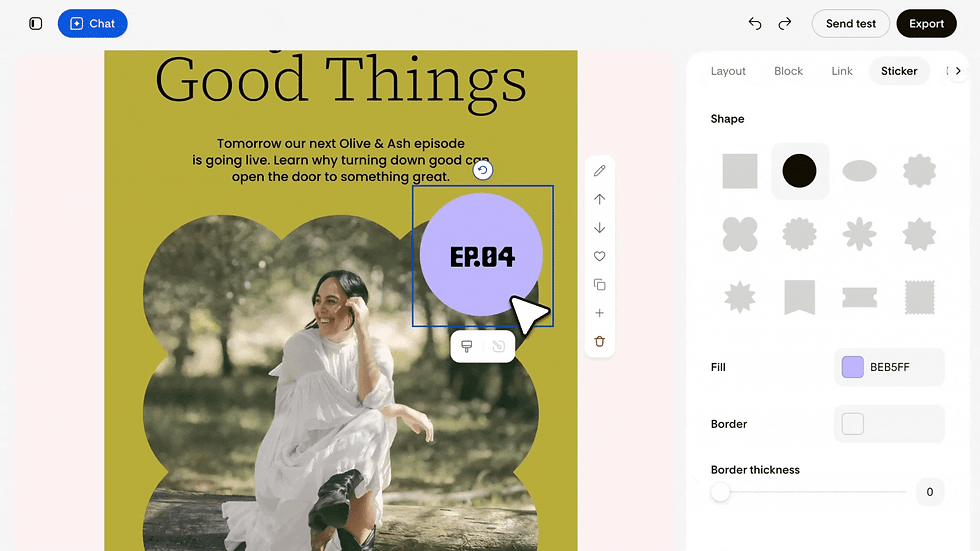
Step 4: Edit Your Way (Chat or Pixel-Perfect)
This is where you make it yours. You can edit by chatting with the AI ("Make this headline punchier") or by hand with blocks (drag, drop, swap photos, rotate stickers).
The block menu is deep. Alongside basics like text, image, button, and logo, there are layout blocks for header, banner, list, testimonial, countdown, poll, quote, personal bio, and signature. You stay in control the whole way through.
Step 5: Send or Export
When the design is done, you have two paths:
Send through Flodesk: Schedule and send directly from Flodesk
Export HTML: Export clean HTML and paste it into Mailchimp, ConvertKit, Beehiiv, or any ESP that supports HTML
From blank canvas to a finished, on-brand newsletter sitting in your scheduler: the whole thing takes 10-15 minutes.
Flodesk Studio Pros & Cons: The Complete Breakdown
What We Love About Flodesk Studio
✓ Set Your Brand Once, Every Email Starts On-Brand No more pasting hex codes each time. No more selecting the same font and size repeatedly. Your brand is baked in from the start.
✓ Genuinely Fast (10-15 Minutes vs. 1-2 Hours) A first draft in minutes, not hours. The three-direction approach kills blank-page paralysis. You're editing, not starting from nothing.
✓ No Platform Lock-In The HTML export means you're not forced to switch email providers to get a nice design. Design in Studio, send from wherever you already send.
✓ Human-Designed Foundation Every layout begins with work from world-class designers, so your emails look made, not generated. The AI accelerates the process; real designers built the system.
✓ Flexible Editing Refine in chat ("Make this warmer") or pixel-by-pixel by hand. Your brain, your way.
What to Watch Out For
✗ Layout Blocks Render as Images Some of Studio's layout blocks render as images, not live text. This can affect accessibility and how some inboxes read your email. Use real text blocks for anything important, especially calls-to-action.
✗ One Brand Profile Per Account (For Now) Currently, it holds one brand profile per account, so it's not built for managing lots of clients yet. Multi-brand support is on the roadmap.
✗ Editing Is One-Way After Export If you spot a typo after exporting the HTML to your email provider, you fix it back in Studio and re-export. You can't edit directly in your email host.
✗ Future Pricing Uncertain It's free in beta, but pricing after launch hasn't been finalized. Flodesk is using the beta period to figure out value-based pricing.
Flodesk Studio vs. Traditional Email Design Methods
Feature | Flodesk Studio | Traditional Email Design (Mailchimp, ConvertKit, etc.) | Hiring a Designer |
Time to First Draft | 10-15 minutes | 45-90 minutes | 3-7 days |
Cost | Free (beta) / TBD (after) | $0-$300/month | $500-$2,000+ per email |
Brand Consistency | Automatic (set once) | Manual (every email) | High (designer handles) |
Design Quality | Professional (human-designed foundation) | Template-based (varies) | Custom (highest quality) |
Ease of Use | Very easy (AI-assisted) | Moderate (learning curve) | N/A (outsourced) |
Customization | High (edit chat or pixel-perfect) | Moderate (template-limited) | Unlimited |
Platform Lock-In | None (HTML export) | Moderate (platform-specific) | None |
Scalability | Excellent (create many emails quickly) | Good (templates speed things up) | Limited (time-intensive) |
Bottom Line: Flodesk Studio is the sweet spot for small business owners, creators, and service providers who want professional-quality emails without spending hours on design or thousands on a designer. It's especially valuable if you're on another email platform and just want better-looking emails without switching.
Frequently Asked Questions About Flodesk Studio
Is Flodesk Studio free?
Yes! Flodesk Studio is completely free while in beta. No credit card or catch. The only ask is your honest feedback as they build. Future pricing hasn't been finalized, but Flodesk is using the beta period to determine value-based pricing.
How long does it take to create an email in Flodesk Studio?
Flodesk Studio generates a first draft in 10-15 minutes, compared to the 1-2 hours traditional email design typically requires. The AI generates three design directions off your prompt, getting you about 80% of the way there. From there, refinement is quick.
Can I use Flodesk Studio with other email platforms?
Yes! You can export your email as clean HTML and use it with any email service provider that supports HTML, including Mailchimp, ConvertKit, Beehiiv, Kit, and more. You're not locked into Flodesk. Just note: some of Studio's layout blocks render as images, so test before relying on them in another platform.
Do I need a Flodesk account to use Studio?
No. During the beta, Flodesk Studio is open to anyone. You can design in Studio and export the HTML to any email platform, even if you don't have a Flodesk account. It works best inside Flodesk, but that's not required.
Is Flodesk Studio AI-generated or human-designed?
Flodesk Studio uses a human-designed foundation, accelerated by AI, and finished by you. Real designers built the system and all the layout components. The AI speeds up the process and applies your brand, but you stay in control of every pixel.
Can I edit an email after exporting it to another platform?
Edits happen in Studio, not in your email provider. If you spot a typo after exporting, you fix it back in Studio and re-export. This is a one-way workflow by design, so keep that in mind if you're exporting to another platform.
Who is Flodesk Studio best for?
Flodesk Studio is built for small business owners, creators, coaches, therapists, and service providers—anyone who needs professional-quality emails but design isn't their zone of genius. It's an especially easy yes if you're on another email platform and just want better-looking emails without moving your whole list.
When will Flodesk Studio come out of beta?
Flodesk has not yet announced a specific date for Studio to exit beta. They are currently using the beta period to gather user feedback and refine the product. Future pricing will be determined based on value during this period.

Flodesk Studio for Every Business Owner: From Solopreneur to Enterprise
Flodesk Studio isn't just for individual creators; its intuitive design and powerful AI-accelerated features make it a game-changer for businesses of all sizes.
Whether you're a solopreneur just starting out, a growing small business, or an established enterprise, Studio offers unique advantages to streamline your email marketing and elevate your brand.
Solopreneurs & Small Businesses: Maximizing Impact with Minimal Effort
For solopreneurs and small business owners, time is often the most precious commodity. Flodesk Studio addresses this directly by drastically cutting down the time spent on email design, allowing you to focus on your core business activities.
Rapid Content Creation: Instead of spending hours wrestling with design, you can now craft a professional, on-brand email in 10-15 minutes. This means more consistent communication with your audience, leading to stronger engagement and sales.
Brand Consistency on a Budget: Hiring a professional designer for every email is often out of reach. Studio ensures every email looks like it was designed by a pro, maintaining a cohesive brand image without the recurring cost.
Easy Integration: Whether you use Flodesk for sending or export to another ESP like Mailchimp or ConvertKit, Studio's clean HTML export ensures your beautifully designed emails work seamlessly with your existing workflow.
Focus on Strategy, Not Design: By automating the design heavy-lifting, you can dedicate more mental energy to crafting compelling copy, segmenting your audience, and optimizing your email marketing strategy for better results.
Use Cases for Solopreneurs & Small Businesses:
Weekly Newsletters: Consistently deliver value and updates to your subscribers.
Product Launches: Create stunning, high-converting launch sequences.
Welcome Sequences: Onboard new subscribers with a polished, branded experience.
Promotional Campaigns: Design eye-catching sales and discount emails quickly.
Growing Businesses: Scaling Email Marketing with Efficiency
As your business grows, so does the complexity of your marketing efforts. Flodesk Studio helps growing businesses scale their email marketing without sacrificing quality or draining resources.
Empower Your Team: Even team members without design experience can create professional emails, reducing bottlenecks and freeing up designers for more complex tasks.
Maintain Brand Standards: With your brand profile set in Studio, every team member can produce emails that adhere strictly to brand guidelines, ensuring a unified message across all communications.
A/B Testing Made Easy: Rapidly design multiple variations of an email to A/B test different headlines, calls-to-action, or layouts, leading to continuous improvement in conversion rates.
Cost-Effective Scaling: Avoid the escalating costs of external design agencies or expanding an in-house design team for routine email creation. Studio provides enterprise-level design quality at a fraction of the cost.
Use Cases for Growing Businesses:
Automated Workflows: Design emails for complex automation sequences (e.g., abandoned cart, re-engagement).
Event Promotions: Create visually appealing invitations and follow-ups for webinars, workshops, or local events.
Customer Segmentation: Tailor email designs for different customer segments without starting from scratch each time.
Partnership Communications: Develop co-branded emails efficiently for joint ventures.
Enterprise Solutions: Consistency, Control, and Innovation
For larger enterprises, brand consistency, control, and the ability to innovate quickly are paramount. Flodesk Studio offers a unique blend of these elements, making it a valuable tool even within complex organizational structures.
Centralized Brand Management: Ensure all departments and teams adhere to corporate brand guidelines with a single, centralized brand profile. This eliminates off-brand communications and reinforces brand identity.
Accelerated Campaign Deployment: Rapidly deploy email campaigns across multiple product lines, regions, or initiatives. Studio's speed allows for agile marketing responses to market changes or opportunities.
Reduced Design Overhead: While enterprises often have in-house design teams, Studio can significantly reduce the workload for routine email creation, allowing designers to focus on high-level creative strategy and brand development.
Seamless Integration with Existing Tech Stacks: The ability to export clean HTML means Studio can integrate with virtually any enterprise-level Email Service Provider (ESP) or marketing automation platform, providing design flexibility without disrupting existing infrastructure.
Innovation Through AI: Leverage AI-accelerated design to experiment with new email formats and visual styles, staying ahead of competitors and engaging audiences in novel ways.
Use Cases for Enterprise Businesses:
Global Marketing Campaigns: Ensure brand consistency across international email communications.
Internal Communications: Design engaging internal newsletters and announcements.
Product Marketing: Rapidly create emails for new product features, updates, and announcements.
Compliance & Legal Communications: Design clear, professional emails for important updates while maintaining brand standards.
Flodesk Studio empowers businesses of all sizes to achieve professional, on-brand email marketing with unprecedented speed and efficiency. It's not just an email design tool; it's a strategic asset for brand building and audience engagement.
Flodesk is building in public. Studio opened to Flodesk members on June 23, 2026, with a public launch on June 30, 2026. Features are shipping daily, and the team is actively gathering feedback to shape the product.
Final Thoughts: Why Flodesk Studio Matters
Email is one of the most powerful marketing channels available—nothing beats it for ROI. But email design has always been the friction point. Hours wrestling with templates. Fonts that don't render. Spacing that breaks on mobile. Generic designs that don't feel like your brand.
Flodesk Studio removes that friction. It gives you a place to create emails that look and feel like your brand, without spending hours on design or thousands on a designer.
And right now? It's free in beta. No risk to try it out.
Ready to create your first on-brand email? Head over to studio.flodesk.com and start building today. The artist is you.
Explore More Flodesk Resources
Want to dive deeper into email marketing and Flodesk? Check out our related articles:
Advanced Strategies for Business Owners: Beyond the Basics
To truly leverage Flodesk Studio for business growth, consider these advanced strategies that cater to both small and enterprise-level needs.
1. Integrating Flodesk Studio with Your CRM and Sales Funnel
For businesses focused on lead nurturing and sales, integrating your email marketing with your Customer Relationship Management (CRM) system is crucial. While Flodesk Studio exports HTML, the key is how you use that HTML within your broader sales funnel.
Automated Follow-ups: Design a series of high-converting emails in Studio for your post-purchase or lead-nurturing sequences. Export them and integrate into your CRM (e.g., HubSpot, Salesforce) to trigger based on customer actions.
Personalized Campaigns: Use Studio to design templates that can be easily personalized with dynamic content from your CRM, ensuring each email feels bespoke to the recipient.
A/B Testing Beyond Design: While Studio helps with design A/B testing, integrate with your ESP to test subject lines, send times, and calls-to-action for optimal performance.
2. Leveraging Analytics for Continuous Improvement
Email marketing is an iterative process. Flodesk Studio provides the design, but your ESP provides the analytics. Combine both for a powerful feedback loop.
Track Key Metrics: Monitor open rates, click-through rates, conversion rates, and unsubscribe rates for every campaign designed in Studio.
Identify Design Performance: Analyze which design elements (e.g., button placement, image usage, call-to-action visibility) contribute to higher engagement. Use this data to refine your Studio prompts and manual edits.
Segment-Specific Optimization: If you're sending to different customer segments, track their performance separately. Studio allows you to quickly adapt designs for each segment based on what resonates most.
3. Building a Content Library with Studio
Think of Flodesk Studio as a tool to build not just individual emails, but a reusable content library that accelerates all your communications.
Master Templates: Create a few core "master templates" in Studio for different purposes (e.g., sales, newsletter, announcement). These can be quickly adapted for any new campaign.
Block Library: Save frequently used blocks (e.g., testimonials, product showcases, social media links) within Studio or your ESP for drag-and-drop efficiency.
Seasonal & Evergreen Content: Design a library of seasonal emails (holidays, sales events) and evergreen content (welcome series, educational drips) that can be deployed with minimal adjustments.
4. Training Your Team: Empowering Non-Designers
For growing businesses and enterprises, empowering your team to create on-brand emails is a massive time-saver. Flodesk Studio's intuitive nature makes this possible.
Internal Guidelines: Develop clear internal guidelines for using Studio, including prompt best practices, brand voice adherence, and approval workflows.
Training Workshops: Conduct short workshops to train marketing, sales, and even customer service teams on how to use Studio to create their own on-brand communications.
Centralized Feedback: Establish a system for providing feedback on Studio-designed emails to ensure quality and brand consistency before deployment.
By implementing these advanced strategies, business owners can transform Flodesk Studio from a simple email design tool into a central pillar of their marketing and communication infrastructure, driving efficiency, consistency, and ultimately, growth.


Thank you for sharing this informative article. I appreciate how clearly the information is explained for readers who want to learn more about lottery results. People searching for loteria nacional can benefit from checking official announcements, understanding the published results, and confirming the draw date before relying on any information.
Trying a new AI email tool recently reminded me how much smoother software support feels when I can reproduce the exact step that confused me. I wrote down the account email, browser, subscription level, feature name, and the last action before the issue appeared instead of sending a vague message. For a similar account or platform question, Overjet customer service serves as the reference once those practical details are ready. I would keep any clinical or professional decisions separate and use customer support only for login, billing, account settings, access, or technical workflow questions. That boundary keeps the request simple. My own experience with SaaS tools is that a short, reproducible example gets a much clearer answer than a long description…
When you need a quick activity for kids, having a reliable source of printable sheets is helpful. PhotoColorify’s collection includes a range of themes, from anime to holidays and animals, so there’s usually something fitting for the occasion. The A4 PDF downloads are convenient for classroom use or home printing, and the option to color online directly in the browser saves paper when you prefer a digital approach. PhotoColorify’s printable library is a good starting point for themed activities.
This guide provides an excellent overview of Flodesk Studio's approach, particularly its combination of a human-designed foundation with AI acceleration to create on-brand emails. The emphasis on eliminating design bottlenecks and avoiding platform lock-in is a significant benefit for https://cellesim.com/ anyone managing their own marketing efforts.